Interactable Nodes
These nodes allow to reference and interact with interactable and manipulable objects in the scene.
Get Nodes
Get Interactable Node
🔍
Reflectis>Get>Reflectis GameObject: Get Interactable
This Node is used to reference the interactable component of the GameObject indicated in the input.
-
⬇️ Input:
- GameObject (
GameObject), the GameObject to get the interactable component from. If left empty, it defaults to the current GameObject.
- GameObject (
-
⬆️ Output:
- Interactable (
IInteractable), the interactable component of the specified GameObject.
- Interactable (
Get Contextual Menu Interactable Node
🔍
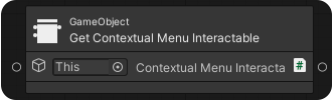
Reflectis>Get>Reflectis GameObject: Get Contextual Menu Interactable
This Node is used to reference the Contextual Menu component of the GameObject indicated in the input.
-
⬇️ Input:
- GameObject (
GameObject), the GameObject to get the contextual menu component from. If left empty, it defaults to the current GameObject.
- GameObject (
-
⬆️ Output:
- ContextualMenuInteractable (
IContextualMenuManageable), the contextual menu component of the specified GameObject.
- ContextualMenuInteractable (
Get Manipulable Node
🔍
Reflectis>Get>Reflectis GameObject: Get Manipulable
This Node is used to reference the manipulable component of the GameObject referenced in the input.
-
⬇️ Input:
- GameObject (
GameObject), the GameObject to get the manipulable component from. If left empty, it defaults to the current GameObject.
- GameObject (
-
⬆️ Output:
- Manipulable (
IManipulable), the manipulable component of the specified GameObject.
- Manipulable (

Expose Nodes
Expose Visual Scripting Interactable Node
🔍
Reflectis>Expose>Reflectis: Expose Visual Scripting Interactable
-
⬇️ Input:
- Interactable (
IVisualScriptingInteractable), reference to the Visual Scripting Interactable to expose.
- Interactable (
-
⬆️ Output:
- GameObjectReference (
GameObject), reference to the GameObject owning the interactable from the input - InteractionState, reference in which state the object is between idle, selected, interacting and hovered
- InteractionColliders (
List<Collider>), list of the colliders referenced in the interactable placeholder.
- GameObjectReference (
Expose Manipulable Node
🔍
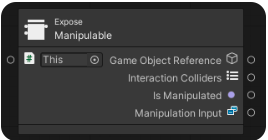
Reflectis>Expose>Reflectis: Expose Manipulable
-
⬇️ Input:
- Manipulable (
IManipulable), reference to the Manipulable to expose.
- Manipulable (
-
⬆️ Output:
- GameObjectReference (
GameObject), reference to the GameObject owning the manipulable from the input - InteractionColliders (
List<Collider>), list of the colliders referenced in the interactable placeholder - IsManipulated (
bool), check if the object is being manipulated - ManipulationInput, reference to the method used to manipulate the object (VR hands, VR lasers, mouse).
- GameObjectReference (
Flow Nodes
Interactable Block Interaction By Selection Node
🔍
Reflectis>Flow>Reflectis Interactable: BlockInteractionBySelection
This Node manages the blocking/unblocking of interaction on any interactable component (Contextual Menu, Manipulable, etc.).
- ⬇️ Input:
- Interactable (
IInteractable), reference to the interactable component to block/unblock. If left empty, it defaults to the component on the same GameObject - BlockValue (
bool), a boolean that determines whether to block (true) or unblock (false) the interaction.
- Interactable (
Hide (Contextual Menu) Node
🔍
Reflectis>Flow>Reflectis ContextualMenu: Hide
This Node hides the currently displayed contextual menu.
Release Manipulable Node
🔍
Reflectis>Flow>Reflectis Manipulable: Release Manipulable
This Node releases a manipulable object from its current manipulation state.
- ⬇️ Input:
- Manipulable (
ManipulablePlaceholder), reference to the Manipulable Placeholder. If left empty, it defaults to the component on the same GameObject.
- Manipulable (
Event Nodes
Visual Scripting Interactable
These nodes must be associated with a script machine, that is referenced in the Visual Scripting Interactable placeholder of the object, specifically in the "Interactions Script Machine" variable.
Visual Scripting Interactable On Hover Enter Node
🔍
Events>Reflectis>Reflectis Visual Scripting Interactable: On Hover Enter
This event triggers when the object enters in the "Hovered" state.
- ⬆️ Output:
- Interactable (
IVisualScriptingInteractable), reference to the interactable that triggered the event.
- Interactable (
Visual Scripting Interactable On Hover Exit Node
🔍
Events>Reflectis>Reflectis Visual Scripting Interactable: On Hover Exit
This event triggers when the object exits from the "Hovered" state.
- ⬆️ Output:
- Interactable (
IVisualScriptingInteractable), reference to the interactable that triggered the event.
- Interactable (
Visual Scripting Interactable On Select Enter Node
🔍
Events>Reflectis>Reflectis Visual Scripting Interactable: On Select Enter
This event triggers when the object enters in the "Selected" state.
- ⬆️ Output:
- Interactable (
IVisualScriptingInteractable), reference to the interactable that triggered the event.
- Interactable (
Visual Scripting Interactable On Select Exit Node
🔍
Events>Reflectis>Reflectis Visual Scripting Interactable: On Select Exit
This event triggers when the object exits from the "Selected" state.
- ⬆️ Output:
- Interactable (
IVisualScriptingInteractable), reference to the interactable that triggered the event.
- Interactable (
Visual Scripting Interactable On Interact Node
🔍
Events>Reflectis>Reflectis Visual Scripting Interactable: On Interact
This event triggers when the object enters in the "Interacted" state.
- ⬆️ Output:
- Interactable (
IVisualScriptingInteractable), reference to the interactable that triggered the event.
- Interactable (
On Selected Change
🔍
Events>Reflectis>Reflectis Visual Scripting Interactable: On Selected Change
This event triggers when the currently selected Visual Scripting Interactable changes.
- ⬆️ Output:
- VisualScriptingInteractable (
IVisualScriptingInteractable), reference to the newly selected Visual Scripting Interactable.
- VisualScriptingInteractable (
Manipulable
These nodes must be present inside the graph contained in an object with the Interactable Placeholder and the Manipulable Placeholder.

On Manipulation Start Node
🔍
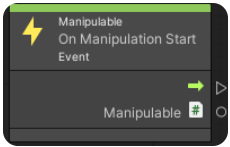
Events>Reflectis>Reflectis Manipulable: On Manipulation Start
This node can monitor when the object enters in the "Manipulated" state.
- ⬆️ Output:
- Manipulable (
IManipulable), reference to the manipulable that started being manipulated.
- Manipulable (
On Manipulation End Node
🔍
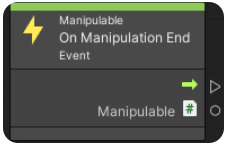
Events>Reflectis>Reflectis Manipulable: On Manipulation End
This node can monitor when the object exits from the "Manipulated" state.
- ⬆️ Output:
- Manipulable (
IManipulable), reference to the manipulable that stopped being manipulated.
- Manipulable (