Addressable setup
If the project setup has been successful, the new project will already have the addressables package system installed.
Now we need to configure addressables, which will be used for uploading environments scenes to the online platform.
in the following paragraph we'll explain how the Addrssable Configuration window works and how to set the addressables correctly.
Addressables Configuration Window
You can easily create addressable groups by going to "Reflectis Worlds > Creator Kit > Core" on the top bar and then click on "Addressables management".

Then, you can setup the addressables configurations and manage wich scenes to build directly from that window.
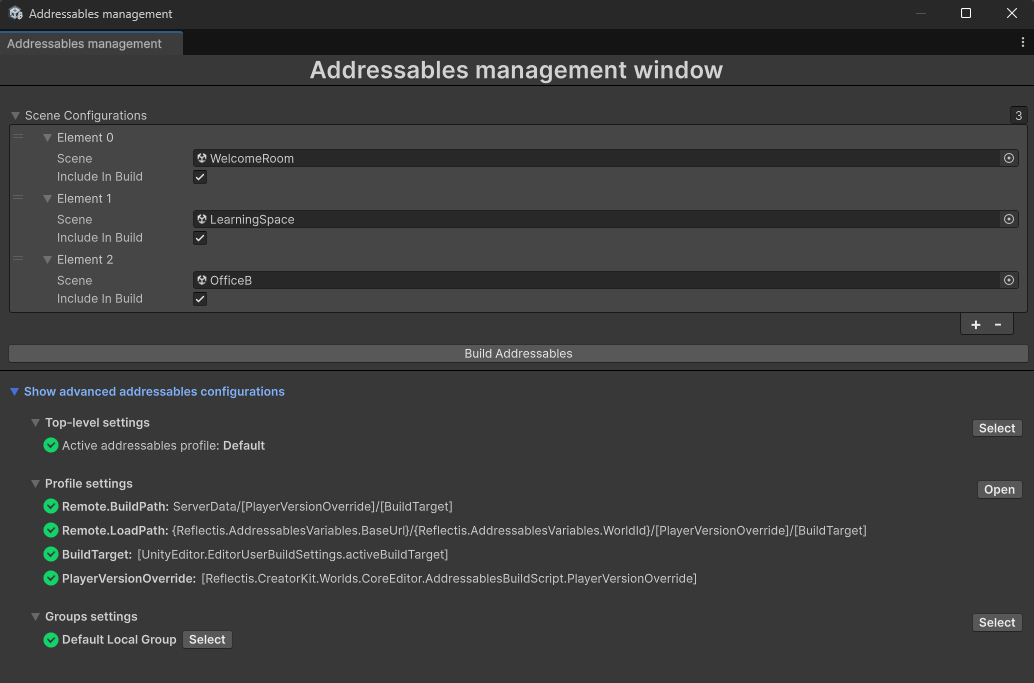
At the bottom of the window, you can view the addressables settings: if any configuration is incorrect, you can fix it directly via the button above.
Once the addressables settings are correct, to choose which scenes to include in the build, simply reference them in the “scene list configuration” list (for each scene, you can choose whether or not to include it in build via the “IncludeInBuild” checkbox). Each built scene will produce a .zip file containing all the necessary bundles for each platform.
The addressables configurations should be complete now, and you can proceed to the scene setup!