Experience
Experience Analytics
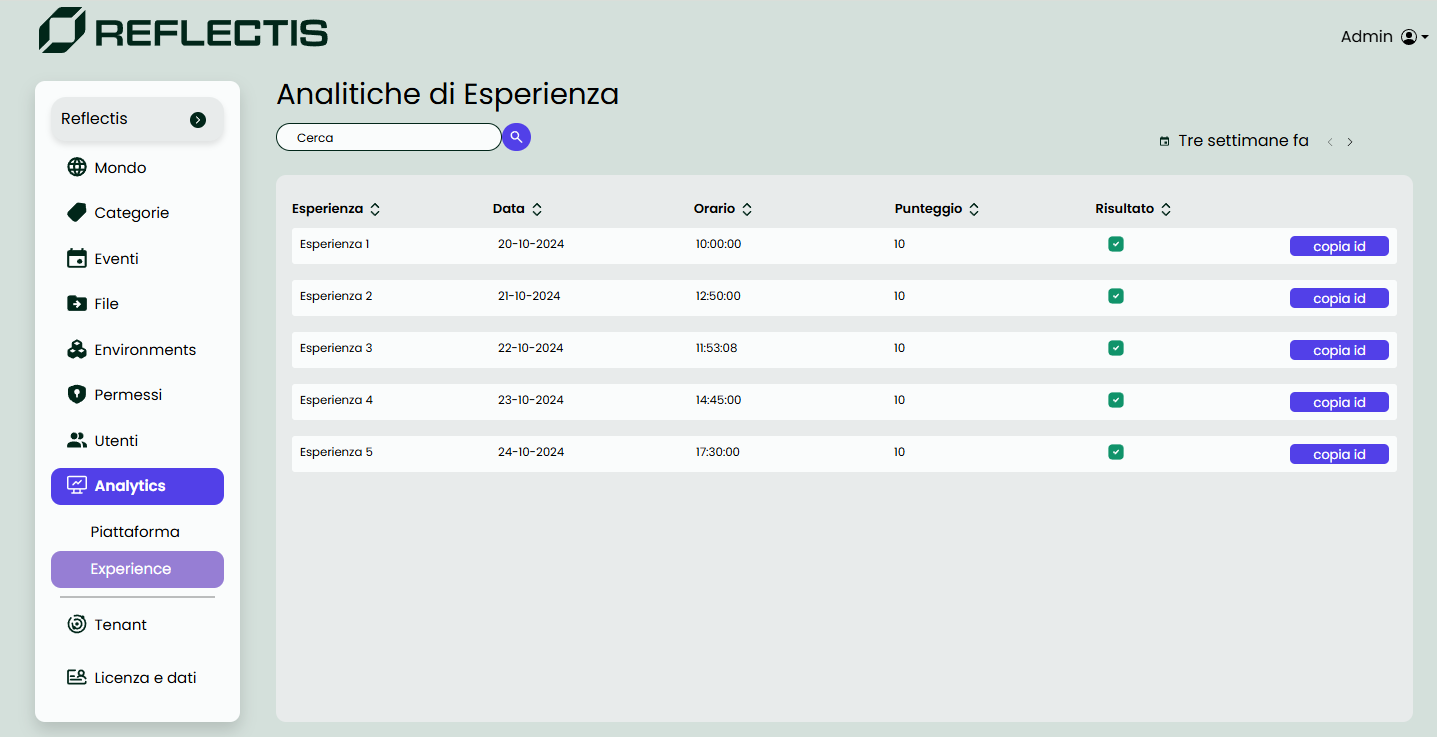
The Experience Analytics page, a subsection under World Analytics, provides administrators with insights into user interactions with specific experiences on the platform. This section includes a searchable list of experiences, along with details about each experience's participants and any steps involved.
New! — you can now export the data you are viewing:

| Action | What it does |
|---|---|
| Download recap | Generates a .csv file summarising every experience run inside the selected time-window (one line per session, including title, start/stop timestamps, participant list and completion rate). |
- Experience List – search by context name; all matching experiences within the date range appear here.
- Experience Details – click an entry to see participants and the steps that compose the experience.
- Step Results – for multi-step flows, open a step to review answers given vs. correct answers and the score for that step.
Filters
The filters in Experience Analytics mirror those in Presence Analytics. Data is available for the last three weeks to keep the focus on recent engagement.
To ensure analytics are recorded, the experience must use the dedicated nodes from the Reflectis SDK Creator Kit. See the Creator Kit documentation for details.
Navigate to World › World Analytics › Experience Analytics in the sidebar to access this page.
The data provided here helps administrators evaluate user engagement, monitor the completion of experience steps and measure performance on embedded tests.