3D assets production
Models and performance guidelines
In order to get your environment or assets performing well on Reflectis supported platforms, or in general on WebGL and mobile devices such as Meta Quest 2, you need to plan carefully where you spend your rendering and memory budgets.
More details can be found on Unity Manuals.
Models and geometries need to follow the common guidelines for real-time and mobile assets production.
Main generic guidelines below.
File format
Recommended 3D file: .FBX/.OBJ
Models
The assets must be grouped by texture packing: every asset that shares the same UVs space must be exported in one .FBX file that acts as a container (e.g., if a chair and a table share the same textures and maps they must be exported in the same .FBX).
Do not create models with sub-materials.
Polycount and draw calls
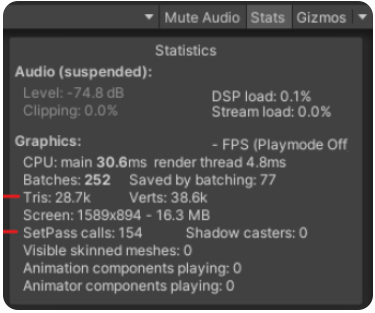
Anything under 300.000 tris for each camera shot is a good target to aim for. This is NOT the total tris count for all meshes included in the scene: your environment can be more than 300.000 tris, but it’s important that this is the** maximum amount** of tris inside the rendered camera.
So, you need to balance your models and creativity. You can for example have:
- An empty room with a 300.000 tris hero object in the middle
- A furnished room with a lot of 5.000 tris props inside (but with a maximum 300.000 tris everywhere the user looks at with the camera).
These are just approximate values, each case needs practical testing, more information here. It’s all about balance and choices 🙂.
Avoid exceeding 200 draw calls/set pass calls.
You can check these values from the “Stats panel” on the Unity engine.
Texture sizes and compression
For single and small objects, it is recommended to keep textures under 1024x1024 px.
In case of grouped objects always framed together, try to pack them in texture atlases with a maximum resolution of 4096X4096 px.
For big surfaces (e.g., floors, walls or ceilings) use the texture tiling to keep the texture as small as possible.
The higher you go with textures (both resolution and number of textures in the scene), the more memory your environment will take up!
For this reason, we ask you to:
- Pay attention on how you create UV maps, optimizing as much as you can the texture reducing empty spaces
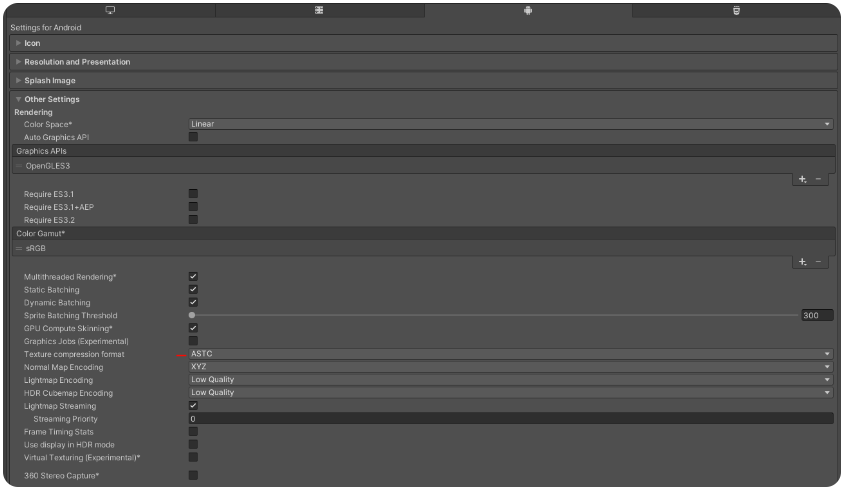
- Always setting the compression mode in Unity to ASTC. You can set ASTC compression from the general project settings (Android tab).