Invites
The "Invites" section enables the generation of invitation codes for new users. Invitations can be either anonymous or personal, and they can be configured with specific roles and expiration dates. The list of available roles always includes a "Standard User" option, along with any roles associated with the current World.
Selectin "Standard User", ensures the creation of an invitation code for a user who will automatically be assigned the system role "Member". Choosing a wolrd-specific role ( i.e., any option other than "Standard User") ensures that the invitation code will assign the system role "Member" as well as the explicitly selected role.
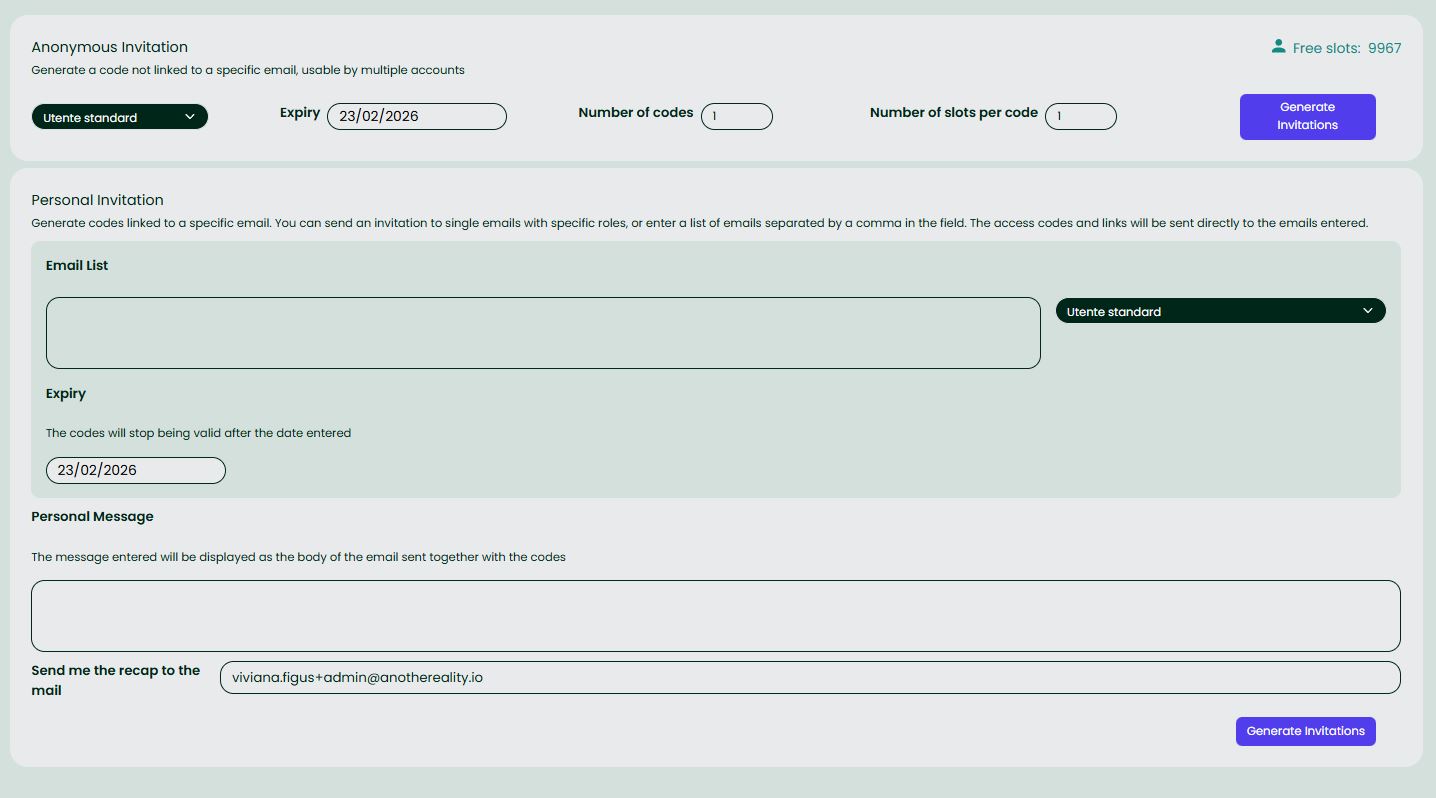
Anonymous Invitation
An anonymous invitation generates a code that is not linked to a specific email address. This code can be used multiple times until the preset maximum numer of uses is reached.
Anonymous Invitation Configuration
- User Role: Select the role to be assigned to new users redeeming the code.
- Expiration Date: Set the date after which the code will no longer be redeemable.
- Number of Slots: Define the maximum number of times the code can be used.
- Generate Invitations: Click the "Generate Invitation" button to create the code.
After generation, the code will be sent to the email address of the user who generated it, and it can then be manually distributed to the intended recipients.
Personal Invitation
A personal invitation generates unique codes associated with specific email addresses. Users will receive an email containing the invitation code, the assigned role, and an access link. A summary of the codes, along with their associated email addresses, will also be sent to the user who generated them.
For each use, the World Owner can specify a single list of email addresses and a single role to associate.
Personal Invitation Configuration
- Email List: Enter one or more email addresses ( separated by commas ) to which the invitations will be sent.
- User Role: Select the role to assign to the invited users.
- Expiration Date: Define the dae after which the codes will no longer be valid.
- Custom Message (Optional): Enter a custom message to be included in the invitation email.
- Send Recap to Email: The default email is the one used for login. To receive a summary of sent invitations at a different email address, enter the desired address in the provided input.
- Generate Invitations: Click the "Generate Invitations" button to send the invitations to the specified email addresses.
General Operation
- Distribution: Once generated, anonymous invitations must be distributed manually, whereas personal invitations are sent automatically via email.
- Email Content: Each email includes the invitation code and the corresponding role name.
- Standard User Invitations: By selecting "Standard User", invitations will be issued for the basic system role "Member" without the pre-assignment of any world-specific roles.
- Multiple Redemptions: Users may receive multiple emails even for the same role ( there are no restrictions on generation), and in the event of a duplicate redemption, a positive feedback message is still displayed.
- Expiration: Once expired, the codes can no longer be used.
- User Registration: Users who receive an invitation can register and access the platform with the assigned role.
Once a user accepts an invitation and obtains a specific role, the World Owner can manage that user's roles independently of any additional potential invitations.