Dashboard
DashboardPlaceholder
Script component to attach to an object to make it a dashboard, which is used to display the list of events, with the categories and details of each one.
When attaching the component to an object, this will become black and a collider will automatically attach to the object. The black color will show how big and large the dashboard will appear in the scene.
The side that will show the content of the dashboard is the one facing opposite of the local Z axis.
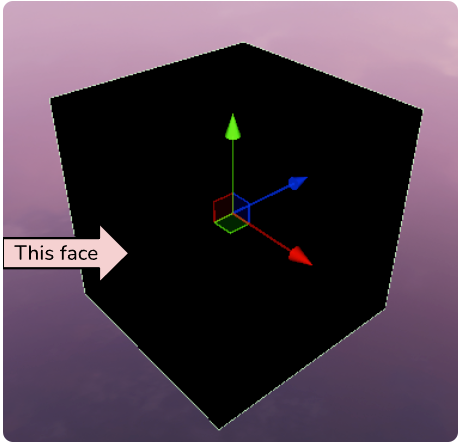
Then, to configure the content shown in the Dashboard Placeholder, you can manage it as follows:
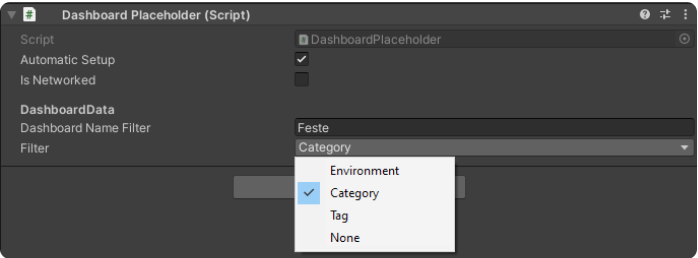
Filter parameter is a selectionable list based on what you want to display on the Dashboard:
-
Environment, you need to pass, on the Dashboard Name Filter parameter, the name of the environment you want to display on it
-
Category, you need to pass, on the Dashboard Name Filter parameter, the name of the category of events you want to display on it
-
Tag & None, currently not implemented their logic.
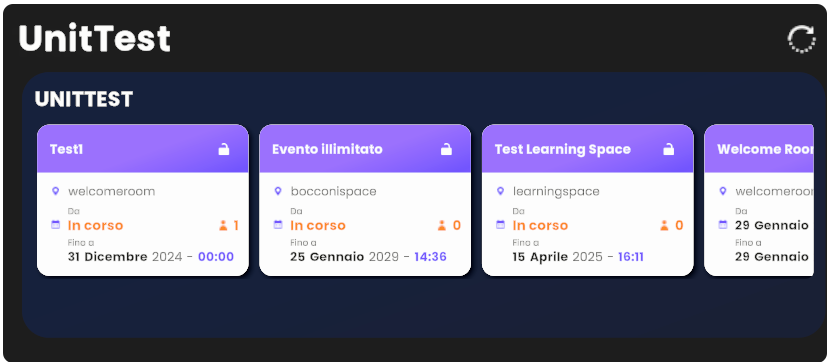
It's important to define the Dashboard Name Filter parameter, to show the elements based on what you chose in the Filter list. For instance, on the image below, we have passed the Category of events named "UnitTest".
In the Creator Kit, you can find the EnvironmentalDashboardPlaceholder as an example of a basic configuration of the dashboard working logic.