Task System Singleplayer
The object TaskSystem contains a script called GraphBehaviour. This script is used to create all the tasks used by the taskSystem. There you can see a button called “Open Graph”. By clicking on it you can access the graph window where you can create all your tasks with associated detectors.
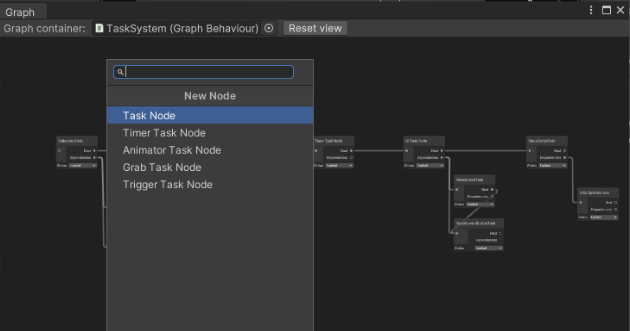
In the Graph window you can create tasks by by pressing the right click on your mouse, then hit create Node and choose the task you want to create form the list of proposed nodes
The possible Tasks and nodes that you can create are:
- Task Node: the simplest task. It is a gameObject containing the TaskListener. The Task Listener can handle callbacks on its completion and start.
- Task Node: it contains a task listener and a TimerDetector gameObject. The timerDetector is used to trigger events after waiting a certain amount of time.
- Animator Task Node: it contains a task listener and an AnimatorDetector. The animator detector is used to trigger events at the start or at the end of an animation.
- Grab Task Node: It contains a task listener and a ManipulableDetector. The manipulable detector is used to trigger events when a certain manipulable object is grabbed or released.
- Trigger Task Node: It contains a task listener and a TriggerDetector. The trigger detector is used to trigger events when a certain rigidbody collides with a trigger collider or exits it.
You’ll notice that in the graph window the node has the Next and Dependencies fields. These are used to handle the logic and flow of the taskSystem.
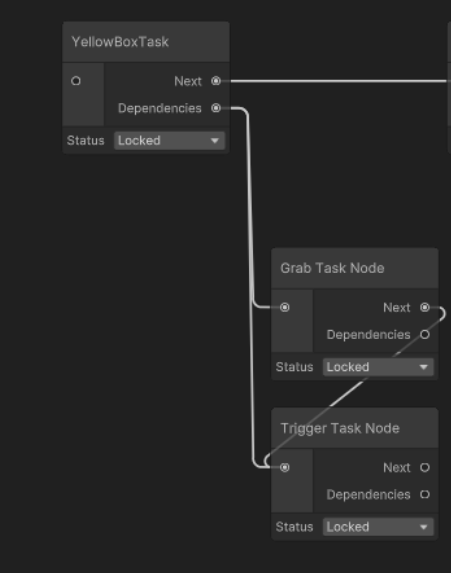
By completing all the dependencies is how the task progresses to the node attached to the "Next" slot.
Task System Multiplayer
In order to make the taskSystem work in multiplayer you simply have to tick the “isNetworked” field in the TaskSystemReflectis and add the TasksRPCManagerPlaceholder to the TaskSystem gameObject. Check the Example Scene in the package to check how to better manage a multiplayer task flow.