Experience
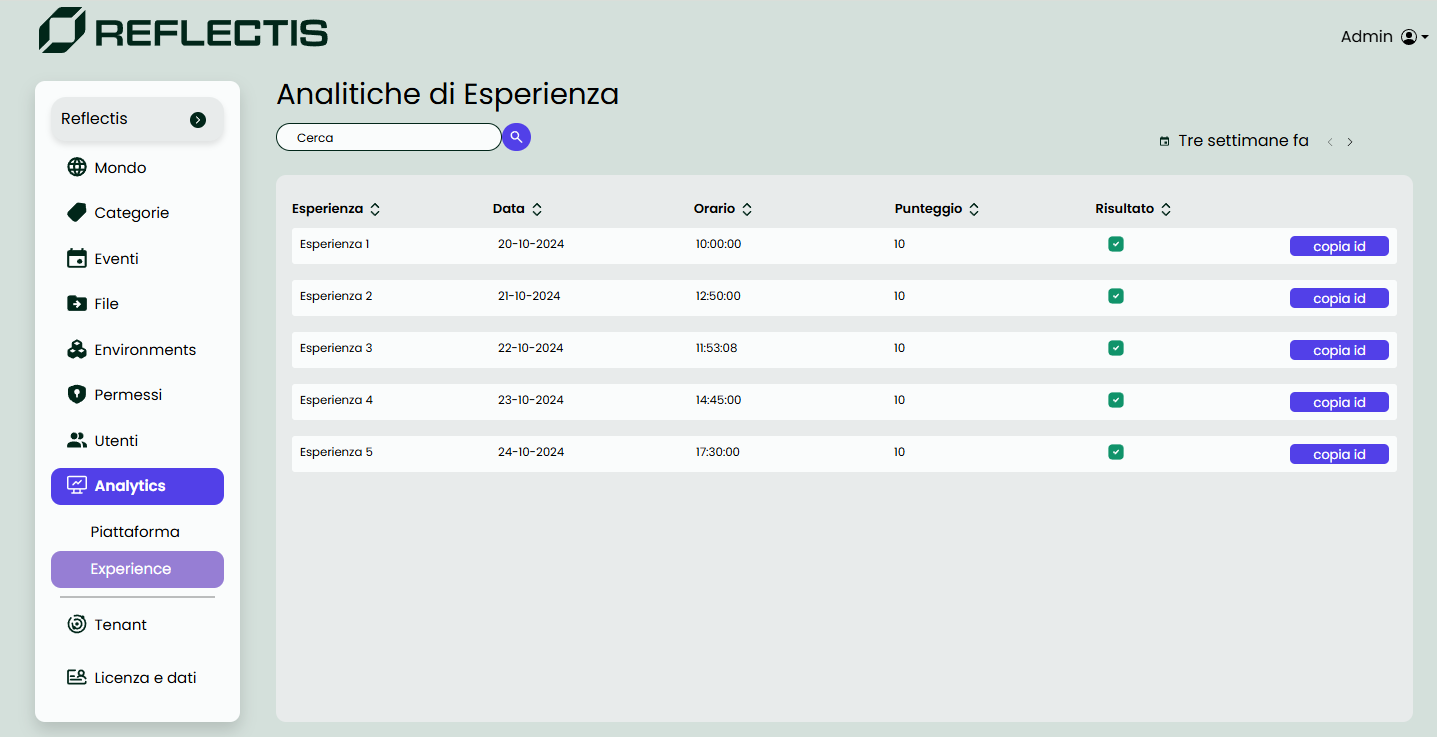
Experience Analytics
The Experience Analytics page, a subsection under World Analytics, provides administrators with insights into user interactions with specific experiences on the platform. This section includes a searchable list of experiences, along with details about each experience's participants and any steps involved.
- Experience List: Administrators can search for specific experiences by entering the context name. The list displays all experiences within the selected time range.
- Experience Details: Clicking on an experience opens a detailed view, showing information such as the participants and any steps associated with the experience.
- Step Results: For experiences with multiple steps, clicking on a specific step displays test results, including selected answers, correct answers, and overall score for that step.
Filters
The filters in Experience Analytics are similar to those in Presence Analytics. Administrators can view historical experience data, but only up to three weeks back, allowing for a focus on recent interactions while ensuring data relevancy.
To ensure that experience analytics are visible in the Back Office, the experience must be created using specific nodes from the Reflectis SDK Creator Kit provided with the application. For detailed instructions on downloading, installing, and using the SDK, please refer to the Reflectis Creator Kit documentation.
To access the Experience Analytics page, navigate to the World Analytics section in the sidebar under World.
The data in Experience Analytics helps administrators evaluate user engagement, monitor completion of experience steps, and assess performance on test elements within each experience.