Visual Scripting Interactable
VisualScriptingInteractablePlaceholder
This script enables the execution of a visual scripting graph upon user interaction.
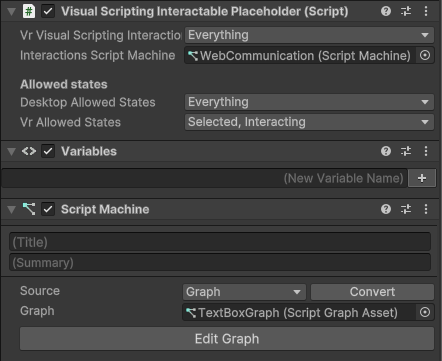
Three states of interaction are defined:
- Hovered: when a user hovers the object with mouse/VR ray interactors.
- Selected: it means the object has been triggered and maintains a selection (like a toggle).
- Interacting: it means the object has been triggered but does not maintain a selection (like a button).
Note that selection and interaction are not mutually exclusive: an object can support both states. In that case, selection is required before performing interaction, i.e. the first action puts the object in Selected state, the second in Interacting state.
For more information, refer to the tooltips provided in the script.
Note
This script requires another script (the InteractablePlaceholder) to be attached to the same GameObject.
If not already on the object, it will be added automatically.
See Interactable section for more info.