Prefabs and Placeholders
Prefabs
After installing the .git packages correctly, you will find a package called "Reflectis-CreatorKit-Worlds-Placeholders" in your project's asset folder.
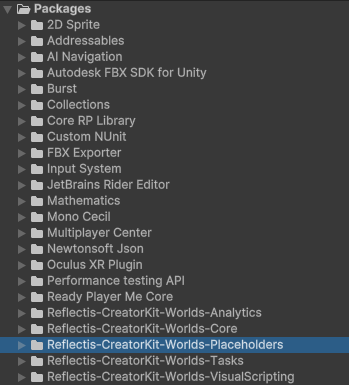
The "Reflectis-CreatorKit-Worlds-Placeholders" package is composed of various asset prefabs with built-in logic, ready to be taken and dragged into your scene, for immediate use.
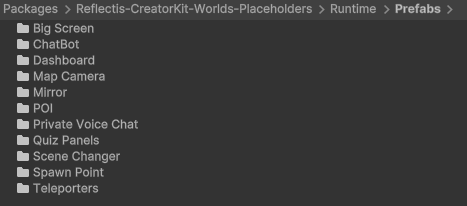
- Big Screen - Panel that allows to display a multimedia content shared with everyone.
- ChatBot - Asset that allows to spawn an AI agent in the scene.
- Dashboard - Object that allows you to show the list of events active in the world.
- Map Camera - Camera that allows you to view the map of the environment from above.
- Mirror - Mirror that allows you to open the avatar customization window [deprecated].
- POI - Object that allows you to present information with images, videos, links and texts by clicking on a button in the environment.
- Private Voice Chat - Object that allows you to create a private area where voice chat is active.
- Quiz Panel - Customizable panel used to create quizes that appear in the environment.
- Scene Changer - Object that allows you to switch from one scene to another
- Teleportation - object that allows teleportation from one point to another, or from one scene to another
You can also download the Reflectis-CreatorKit-Worlds-Tasks" package in your project to be able to use the following prefab
- TaskPanel - Panel shows the flow of tasks created with the Task system. Tasks are events that can be used to give a complex flow to the interactions in the environment.
Script Placeholders
Inside the "Reflectis-CreatorKit-Worlds-Placeholders" package, apart from the prefabs, you can also find individual scripts, each representing a different. These scripts are called script placeholders, since the logic doesn't work until the scene is uploaded to the platform. These scripts can be attached to a GameObject of your choice to give it a specific behaviour. To ensure the proper functioning of individual scripts, they must be accompanied by the correct components inside the object’s Inspector.
Components are the functional elements of every GameObject. These components contain properties that you can edit to define the behavior of a GameObject.
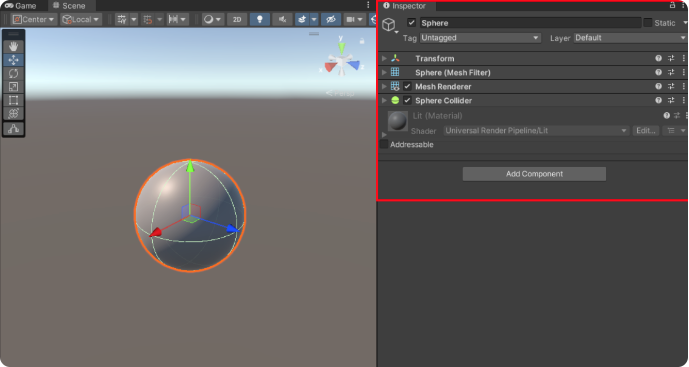
Apart from the aforementioned prefabs, inside the Reflectis-CreatorKit-Worlds-Tasks" package you can also find the scripts components of the following structure:
- InteractablePlaceholder - Script placeholder that allows the creator to set the ways and limits on how to interact with a specific object, for web and VR platform.
Check the Interactable section for more information.