Introduction
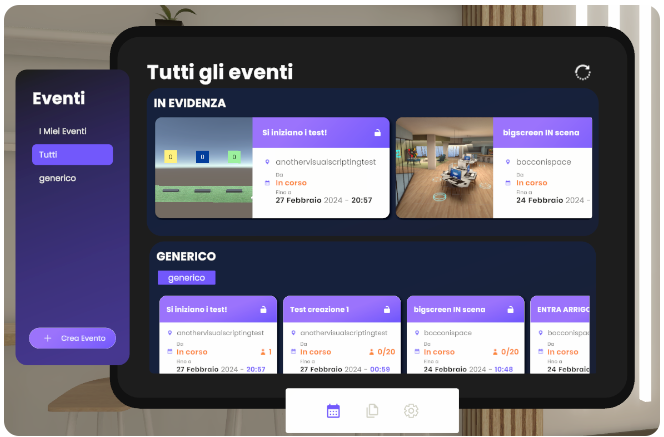
The tablet serves as a central hub, providing access to all the tools and functionalities available on the platform.
It is visually represented as a virtual tablet, appearing as a 2D interface in WebGL and as a 3D object in VR.
Features and Menu
The tablet includes a menu that organizes all the available tools and functions. These features can be accessed directly from the tablet interface.
Key components include:
-
Events Dashboard: Displays a list of public and private spaces that are either active or scheduled. Events can be filtered by their category. The list includes:
- Private Events: Events where invitations have been received.
- Public Events: Events listed in the platform schedule.
- Highlights: Featured or recommended events.
-
Media and Assets: Provides access to multimedia files and 3D assets that can be spawned and used in the room, if permitted.
-
Creative Tools: Provides access to various Reflectis creative tools, including:
- Pencil
- Laser Pointer
- Whiteboard
- Video Chat and Screen Share
-
Settings: Options to customize the platform experience, including:
- Language selection.
- VR main hand configuration.
- Audio and voice chat adjustments.
- Logout functionality.
- Environment saving.