Interactable
InteractablePlaceholder
Script component to attach to an object to make it interactable and associate it with a logic.
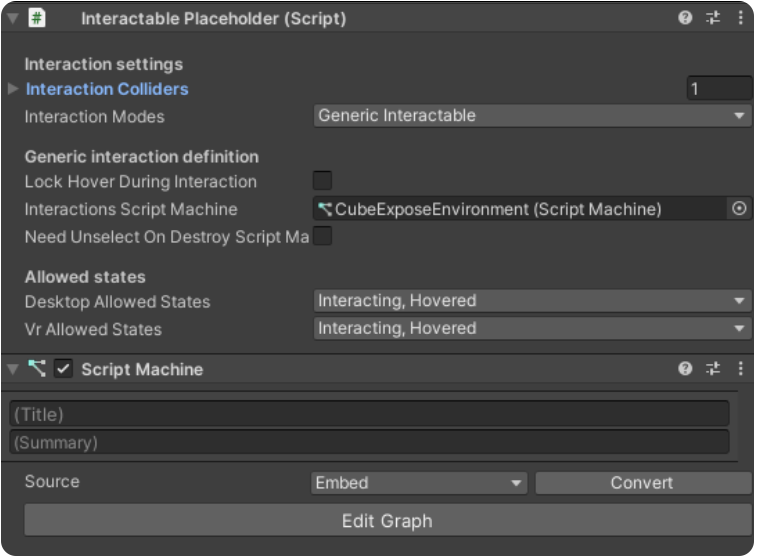
To configure the content shown in the Interactable Placeholder, you can manage it as follows:
-
Interaction Colliders is a parameter in which you have to drag objects that you want to be interactive and be triggered according to the scriptable actions on them.
WarningIt's also important to include in the list the object itself into which the component has been attached, otherwise it will not work
-
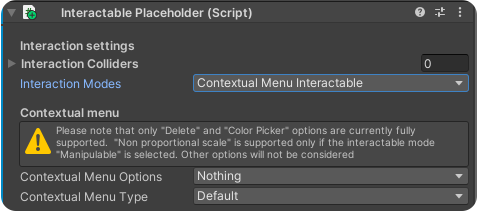
Interaction Modes is a selectionable list based on the type of behaviour to be associated with the object, to be chosen from:
- Everything, any scripted action can be attached
- Generic Interactable, for actions such as selection, interaction and hovering
- Manipulable, for actions such as translation, rotation and scale
- Contextual Menu Interactable, for adding colour picker and non-proportional scaling features in 3D objects (the only currently active).
NoteTo associate these features with an object in the environment, it is necessary to activate the "Manipulable" mode, as well as the "Contextual Menu Interactable" mode.
-
Interaction Script Machine is a parameter where you have to reference the "Script maachine" relating to the object.
Depending on the type of behaviour chosen in the Interaction Modes, one or more sections will appear in the Inspector, according to how many modes have been added.
Then you can add scriptable actions directly in the Script Machine, using Visual Scripting (for more info about this part, see the section Generic Interactable).