Roles

Roles serve the purpose of effectively distinguishing the responsibilities and authorities allocated to each category of users. They facilitate the establishment of a hierarchical structure based on the roles assigned to individual users. Higher-ranking roles possess the capability to oversee critical aspects of the application, whereas lower-ranking roles typically entail simpler, less impactful duties.
To ensure clarity and avoid conflicts in permissions, it is recommended to assign a single role to each user.
As opposed to tags, when it comes to roles, users have two additional options: the ability to manage their visibility within the application and the possibility to designate them as default roles, which are the roles inherited by new users upon registration.
Create a role
To create a new role users can click the "New Role" button, situated at the top right corner of the screen.

This will open up a new window with three sections.
- The first section manages the name and the color of the role itself. It's possible to set a role as "Visible", so other people can see it under the nametag in the application, and set a role as "Default", so a new user will have this role.
- In the second section it's possible to associate the role to specific users, or remove them
- The third section it's where the permits and powers are associated with that role.
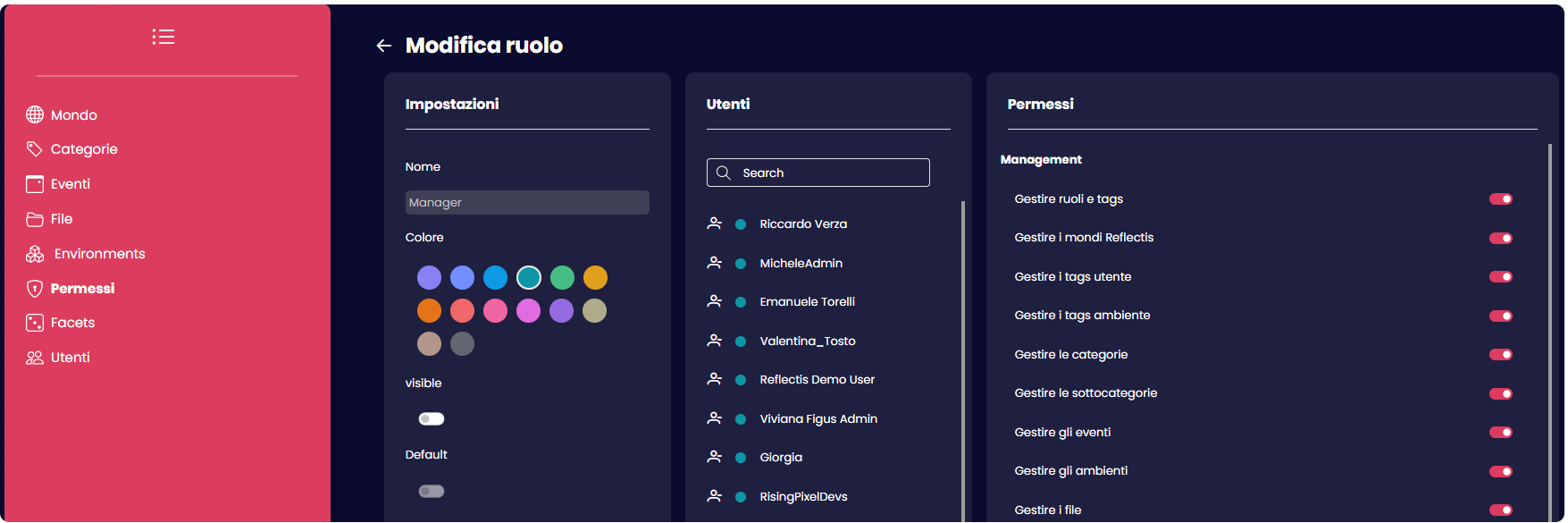
The number of permissions and capabilities that can be associated with roles significantly exceeds the options available for tags. Tags primarily serve as organizational structures for users, while roles are instrumental in defining social distinctions within the application.